Roll former machine files explained
What a roll former machine file contains, where it comes from, and the upstream mistakes that stop a steel framing run before a single stud is formed.
Tony Huaulmé6 min read
What is a roll former machine file?
A roll former takes a coil of steel strip, passes it through a series of roll stations and delivers a profile: a stud, a track, a lintel section. In the same line it can punch holes, notch and cut to length. The machine does not know what the member is for. It does what its file says.
A machine file is that list of instructions. It holds one entry per member to be formed, in the order they should come out. Machine makers each have their own format and their own control software, which is why you hear of Howick files or Tekla Pinnacle files rather than one standard file.
The file is not a drawing. It carries no picture of the wall. Its job is to make the machine produce the right pieces, marked and ordered so the assembler can build the panels.
What does a machine file contain?
| Content | What it says | What goes wrong if it is off |
|---|---|---|
| Profile | The section the machine forms: on most roll-formers it is fixed by the machine and its coil (web, flange, steel thickness), so the file checks it rather than choosing it member by member | The file was made for another machine or another coil thickness, and the members do not fit their tracks |
| Length | The cut length of each member | A stud too long or too short, found at assembly |
| Punches and notches | Positions along the member for service holes and notches | Holes in the wrong place, or none where the plumber needs them |
| Label | The mark printed on the member | Pieces cannot be matched to their panel |
| Order | The sequence of members, often grouped by panel | The assembler waits for a piece, or sorts a heap |
| Quantity | How many identical members | Shortage or waste |
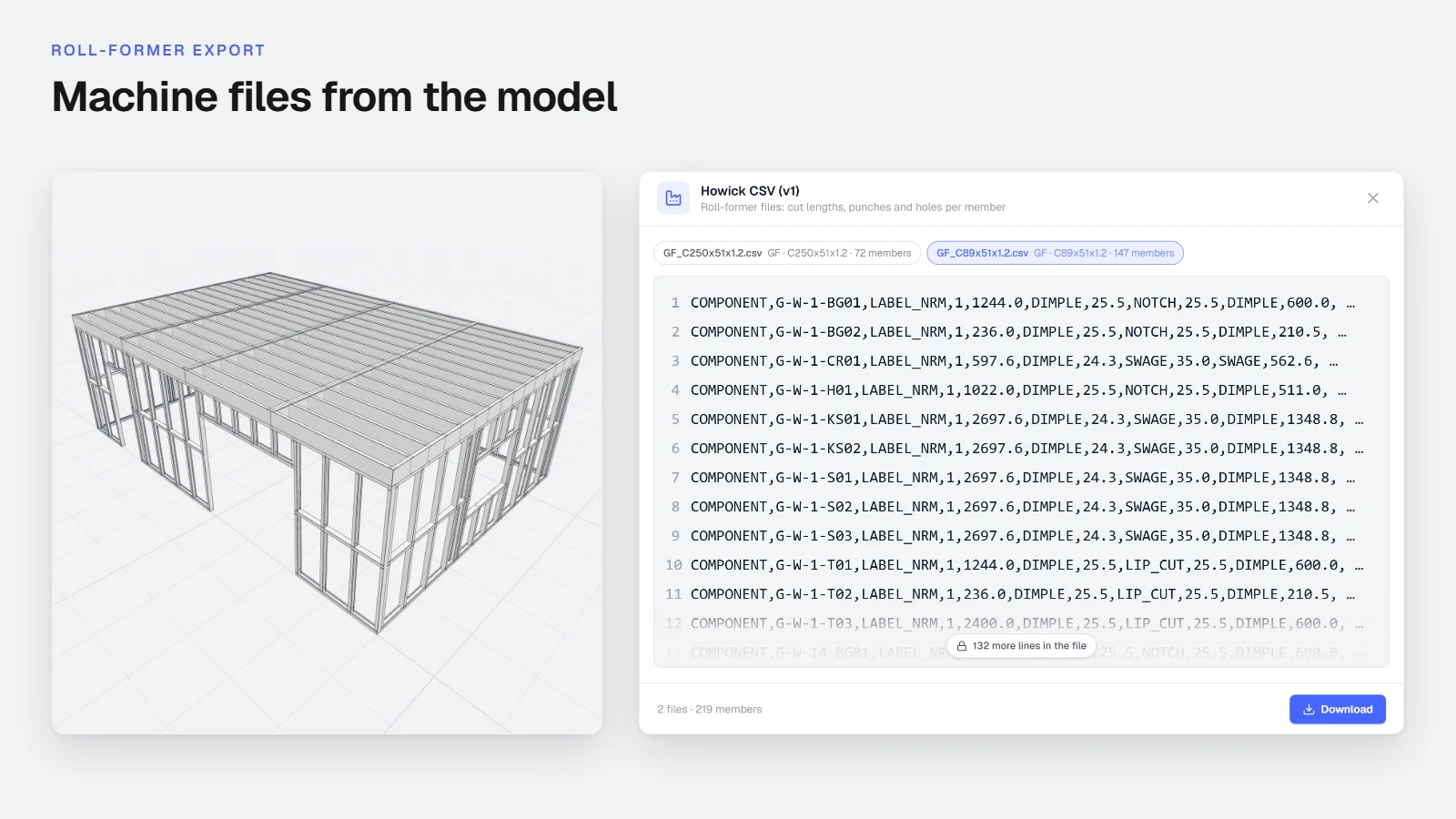
The fields vary with the machine. A file seen in Stud's viewer, for example, carries a line per member with the label, the length and the positions of features along the member, such as flanges, swages and truss ends. Read your own machine's documentation for the exact fields it takes. This article describes the idea, not a particular dialect.
Where does a machine file come from?
From the framing model. The chain runs like this:
- A plan is turned into a building model: levels, walls, openings, roof.
- The walls are split into panels.
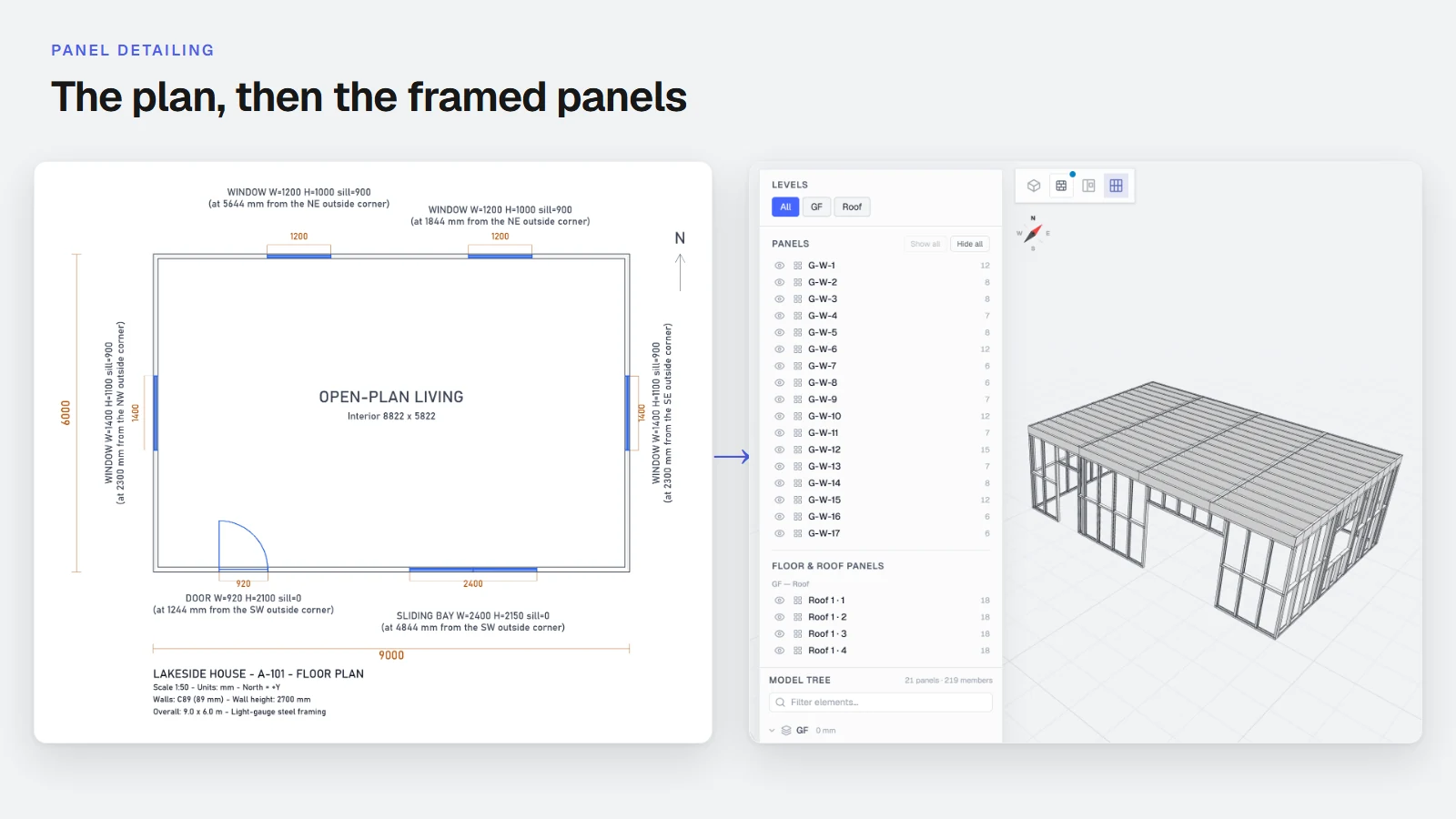
- Each panel is framed: studs, tracks, opening framing, reinforcements, each with a position and a length.
- The software walks through every member of every panel and writes one entry per member, with its mark and its place in the order.
- The entries are written in the format of the machine.
Nothing in the file is invented at step 5. If a member is missing from the model, it is missing from the file. If a length is wrong in the model, it is wrong in the file, and the machine will form it faithfully.
This is why a machine file is the cheapest place to find an error and the most expensive place to miss one. In the model, a fix is a message. On the machine, it is scrap steel and lost time.
Which mistakes upstream end up on the machine?
The usual suspects:
- A wall height that came from a habit, not the plan. Every stud in the building takes the error.
- A thickness or a section assumed. The profile in the file does not match what the engineer specified.
- Openings misplaced. Heads and trimmers follow the opening, so they move with it.
- Panel joints inside openings. The file is valid, the panel cannot be built the way it was drawn.
- Duplicate marks. Two members with one label. The machine prints both.
- Members longer than the machine or the table can handle. The file is accepted, the shop cannot use it.
- A machine file generated for the wrong tools. A file that asks a machine for a punch it does not have.
What should you check before you load a file?
- The framing. Look at the model in 3D and at the panel sheets. Check every opening against the plan.
- The marks. Each mark once, on one member.
- The longest and the shortest members. Do they suit your machine and your table?
- The tools. The file should ask for nothing your roll-former cannot make. Set your machine's tools once and every file respects them.
- A short run. Form a few members of one panel and fit them to check the whole chain before releasing a building.
None of this replaces your engineer's approval of the design. It protects you from your own plan reading.
Why does the order of the file matter?
A roll former forms members one after the other, so the order of the file is the order of the pieces on the table. A file sorted by length is easy to write and awkward to use: the assembler gets all the long studs, then all the short ones, and the panels cannot start until the end of the run. A file sorted by panel lets one panel be built while the next is being formed.
Order also decides how often the coil changes. Members of the same steel thickness are best grouped, so the machine is not stopped to change coil between two panels. Groups by panel and groups by section pull in opposite directions, and the right balance depends on your shop: how many tables you have, how many people assemble, how long a coil change takes. Check the order of a file against the way your shop works, on a short run, before you release a building.
Labels follow the same logic. A label that carries the panel name and the member mark lets the assembler place a piece without looking at the drawing. A label that carries just a number sends them back to the sheet each time.
How does Stud produce machine files?
Stud is an AI agent for builders who receive 2D plans. It reads a DXF, a PDF, an image of a plan or a dimensioned sketch, builds the 3D model, takes standard values for the dimensions the plan lacks and lists them as assumptions. It then splits the walls into panels and frames them in light gauge steel.
In the Framer plan, the same model gives you machine files for Howick and Tekla Pinnacle roll-formers, an IFC model (architecture, framing and panels) and production PDFs: the framing plan per level and the panel sheets. The files carry the members of the model as it is on screen, so what you check is what the machine receives.
Your machine's tools go in Settings, so the files carry what your machine can make. The terms used here are defined in the framing glossary. The step-by-step export is in how to export machine files, IFC and production PDFs. What the panel drawings contain before they become files is in light gauge steel panel detailing from 2D plans. The product page is Stud for light gauge steel.
For how the two materials compare, see light gauge steel vs timber frame. Machine files for timber workshops are a different world, and Stud does not produce them. For how a timber frame workshop is organised around its panels, see the sister guide on the timber frame prefabrication workshop workflow.
How do you start?
Take a plan you have already framed another way and run it through Stud's free beta. Read the framed model, open the panel sheets, and compare the members with your own list. Sign up and try it on your own plan.
Sources
- Wikipedia, Roll forming (holes and notches added in line on the forming line), checked 6 November 2026
- Wikipedia, Cold-formed steel (framing members: lipped channel studs fitting into unlipped channel tracks), checked 6 November 2026
Questions
What is in a roll former machine file?
For each member: the profile, the length, the punch and notch positions along it, the label to print, and the place in the production order. The exact fields depend on the machine and its software.
Where does a machine file come from?
From the framing model. The software lists every member of every panel, with its marks and positions, and writes them in the format your machine reads.
Which machines does Stud export for?
Howick and Tekla Pinnacle roll-formers, in the Framer plan. Stud also exports IFC and production PDFs from the same model.